

Sortail For Apple Mail  ·  macOS

Sort your inbox.

Finally.

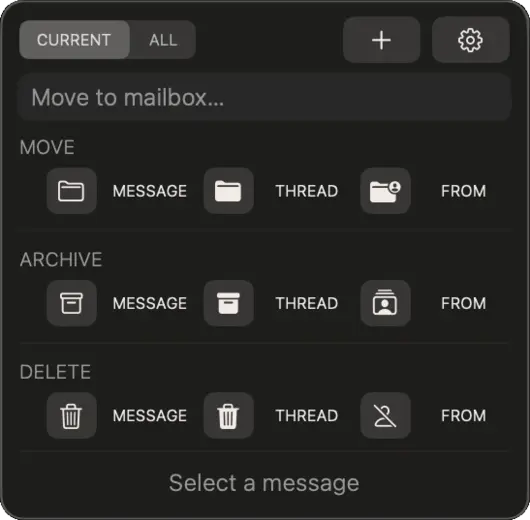
A floating toolbar that lives above Mail. Move, delete, and archive messages, threads, and entire senders — fast, with counts and confirmations where needed.

Coming soon to the Mac App Store Coming soon macOS 13 or later · Core features free
Sortail panel

You shouldn't spend an hour on email
that could take five minutes.

Sortail puts a floating toolbar above Mail. Move, delete, and archive by message, thread, or sender — quickly, with confirmations where they matter. It learns your habits and suggests the right folder automatically.


Everything you need

01
Move, Delete, Archive

Move, Delete, Archive

Handle a single message, an entire thread, or everything from one sender. Bulk actions show a count preview before they run, so you stay in control. No dragging, no menus.

02
Instant actions

Instant folder list.

Sortail reads your mailbox list straight from Mail's local Envelope Index — no slow scripting round-trip just to fetch folders. The full list across your accounts appears as soon as you open the field.

03
Smart Suggestions

Smart Suggestions

Learns from your filing history and pre-selects the right folder as you pick a message. The more you use it, the less you have to think.

04
Stays Out of the Way

Stays Out of the Way

Floats above Mail when you need it, disappears when you switch apps. Just a small menu bar icon — no Dock entry, no notifications begging for attention, no interruptions.

Simple pricing

Pro

Everything you need
to tame your inbox.

$19.99

per year

Coming soon to the Mac App Store

7-day free trial · No payment until trial ends · Cancel anytime

Single-message actions and all panel modes are always free.

Free

Sortail doesn't try to read your email and decide what to do with it. It just speeds up the decisions you're already making yourself.

Why I built Sortail →